Accept a Lesson Request
Answer a lesson request from a parent or student: read it, pick a time, add a meeting link or the place, and LessonPro texts them for you.
When a parent or student taps Request a lesson on your profile, you get a lesson request. You accept it with a day, a time and either a meeting link or a place. LessonPro then texts them the details, so you do not need to type the message yourself.
You have 3 days to answer. After that the request closes.
Where requests show up (push, SMS, Requests)
A new request reaches you in up to three places:
- SMS, always: "New lesson request from Kwame for Mathematics, online. Open getlessonpro.com/login to respond."
- A push notification, "New lesson request", if you use the LessonPro app with notifications on. Tap it to open the request. Turn on notifications.
- Your dashboard. The requests tile shows how many are waiting, and Requests under Tools has a gold badge.
Tap Requests to see them all. New ones sit under Waiting for you, with the hours left to reply. Accepted lessons sit under Upcoming, and old ones under Earlier.
Tap a request to read it. You see the student's name, the parent's name if they gave it, the subject and level, their preferred times and their note. The round WhatsApp and Call buttons let you ask a question before you answer. Only you see their number.
Accept with a time and a link or a place
- On the request, tap Accept and set a time.
- Under Day, pick a day. You can choose today or any of the next 13 days.
- Under Time (Ghana time), pick the start time.
- For an online lesson, paste the Meeting link from Zoom, Google Meet, WhatsApp or Teams. It must start with https. The Platform (optional) is picked for you from your profile. Add a Note for the student (optional), such as "Have your past questions ready".
- For an in-person lesson, check Where the lesson happens. It is filled in from your Where you teach details. Change it if this lesson is somewhere else.
- Read the summary at the bottom, then tap Accept lesson.
More on each kind of lesson: teaching online and where you give in-person lessons.
Cannot take this student? You can decline politely instead, with or without a reason. Decline a request, or what happens if it expires.
What the parent receives
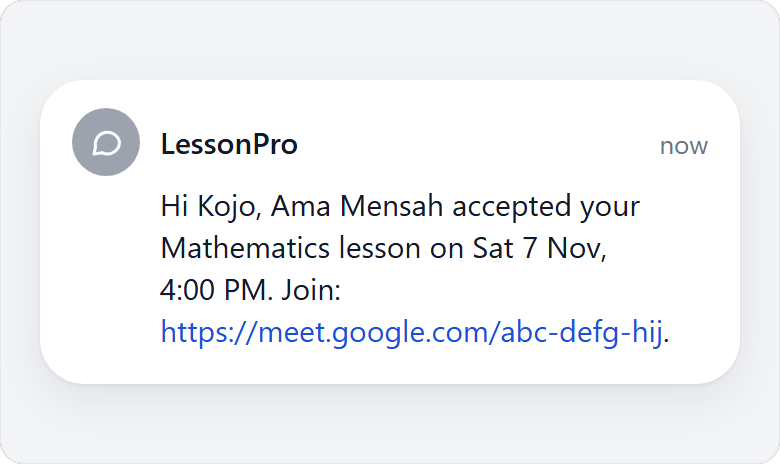
As soon as you accept, LessonPro sends one SMS to the number on the request.
For an online lesson: "Hi Kwame, Ama Mensah accepted your Mathematics lesson on Sat 7 Nov, 4:00 PM. Join:" followed by your meeting link and your note.
For an in-person lesson, the SMS gives the place instead, after "Location:". If you kept the place from your profile and saved a Google Maps link, the link goes in too, after "Map:". If you typed a different place, the map link is left out.
Your street address and map link are never on your public profile. Only the parent whose lesson you accepted gets them: in this SMS, and in My lessons if they asked from the app.
The lesson moves to Upcoming in your Requests. It also counts as a booked lesson in your profile numbers.
Plans changed? Open the lesson and tap Cancel this lesson. We text the student that you cancelled and point them to other tutors, so tell them yourself first if you can.
Teaching the family regularly now? Send them a tuition invoice.